Version 2.6 of OMT’s OnAir has a “not so great” Audio Library search feature. It only searches on the “sort” field, and only finds an exact match from the start of that field.
For example, if looking for something by the Beatles, the DJ could put the sort on “Artist” and type in “BEAT” and find nothing if the artist is in the system as “THE BEATLES”. The DJ is forced to try searching on “THE BEAT”.
DJs need an easier way to find music so a combination of an online search page and OMT export was born.
I know you can export from the LogTools program, but I needed an command line version that could be run on a schedule, so I built OMTCFE, which is OMT Cuts For Export. It outputs a similar export file, with the addition of the “Last Played” field. It uses the same settings as OMTCR in that the categories to ignore are skipped over. This keeps the OMTCR report “in sync” with the OMTCFE output.
I set OMTCFE to run weekly, the morning after most of our new release importing work is done. When OMTCFE runs, it creates the export file, FTPs it to the online site, then triggers the online site’s “import cuts” method. That brings the online database up to date and ready for searching.
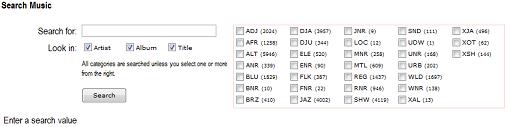
WUMD Search Music
Online, there is a music search page where the DJ types in a search string, and the title, artist and album are searched and all matches are shown. The DJ can limit the searching to any combination of the title, album and artist. Additionally, the DJ can limit the search to specific categories by making selections in the category check box.
Once a cut is found in this way, the DJ can note the Category and ID, and use the On Air Audio Library to cue it up. The Audio Library is set to sort on ID, and the user simply types in the three category letters followed by the cut ID, then clicks on the display song. Whammo, it’s in the cue list!
After a few weeks of use and some feedback, we’ll see of any enhancements are needed. I am considering letting the DJ “tag” any of the search result cuts, creating a sort of play or pick list, then giving the option to display and print the tagged list for use in the studio. We could even create named “groups” for storing and sharing online. Time will tell.


