Two shortcodes in one plugin, this let’s you display information about a file, or a link to a file.
The [ fileinfo ] shortcode will display the name, size and date of a file or list of files. The content is only generated to users that can ‘publish’ posts.
For example, to show information about the file ‘readme.html’ in the main wordpress directory:
[ fileinfo file=’readme.html’ ]
This will result in something similar to:
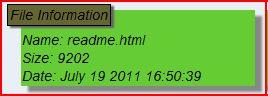
If you want to see a group of files, try:
[ fileinfo file=’*php’ ]
By default, files ‘index.*’ and ‘default.*’ are omited from the listing, but you can override that by specifying a skip.
[ fileinfo file=’*.php’ skip=’wp-*.php’ ]
If you want to generate links to allow downloading, use “filelink” instead. It does not have any user restriction. For example:
[ filelink file=’readme.html’ ]
A clickable link will be generated. Of course, you could easily create that yourself. The power of filelink is that it only shows up if the file exists. This is especially useful to show a list of files, using the wildcard function:
[ filelink file=’readme*.html’ ]
That would show all the files with names that start with ‘readme’.